Your child takes a photo on the tablet, then spreads two fingers to zoom in, and in, and in. At some point the cat in the photo stops being a cat and turns into tiny squares packed side by side, each one a single color. "Why has the picture broken up?"
The answer is a lovely idea from computing: a computer doesn't keep "a cat" at all, only a long string of numbers, each one saying what color one square should be. Here are a few games with squared paper and a pencil that let 7-to-12-year-olds see it for themselves.
A picture on a screen is a grid of squares
Open a photo with your child and zoom in as far as it goes. The little squares that appear are called pixels, short for "picture elements". Each pixel has just one color. A photo taken on a phone has millions of them, so small that our eyes blend them into a smooth picture.
A computer records a picture in the order we read a book: from the top left square along the first row, then the second row, and so on to the end. Every square is written down as a number for its color. To open the picture, the computer reads the numbers back and paints each square on the screen.
Game one: color by numbers, like a computer
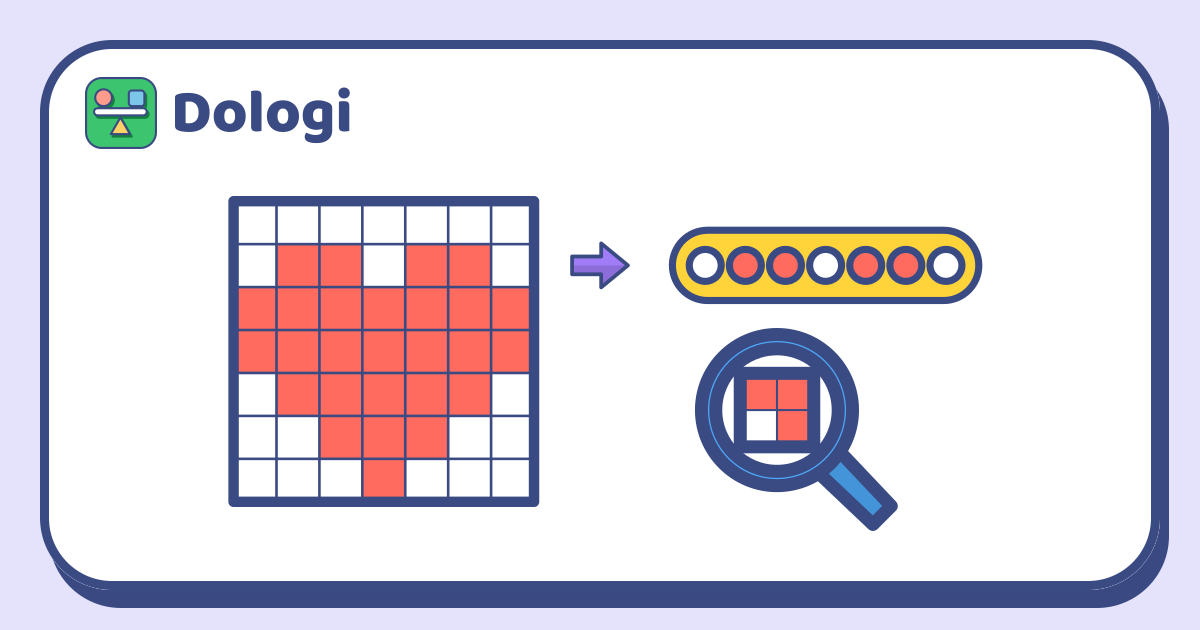
Draw a grid seven squares wide and seven squares tall on squared paper. There is only one rule: 0 is a white square, 1 is a colored square. Read out one row at a time, seven digits per row, and your child colors from left to right:
| Row | Code |
|---|---|
| 1 | 0000000 |
| 2 | 0110110 |
| 3 | 1111111 |
| 4 | 1111111 |
| 5 | 0111110 |
| 6 | 0011100 |
| 7 | 0001000 |
Stop after the third row and ask, "What do you think it's going to be?" When the grid is finished, a heart appears. Your child has just done exactly what a computer does every time it opens a picture: read a number, paint a square.
If one square is colored by mistake, the picture still comes out with just one odd spot. On a computer, too, one wrong number spoils only one pixel.
Making it shorter: "three white, two colored"
Count again: the heart needed 49 digits. That's a lot, and some rows are nothing but 1s in a row. Try a shorter way: instead of writing every square, write how many squares of the same color sit next to each other. The rule: the numbers take turns, white squares, colored squares, white, colored…, and they always start with white. If a row starts with a colored square, write 0 first.
For the heart, row 2 (0110110) becomes "1, 2, 1, 2, 1": one white, two colored, one white, two colored, one white. Row 3 becomes "0, 7". Row 1 only needs "7". The whole picture now takes 19 numbers instead of 49.
Now it's your child's turn to decode a different picture, on a seven-by-seven grid again:
| Row | Code |
|---|---|
| 1 | 3, 1, 3 |
| 2 | 2, 3, 2 |
| 3 | 1, 5, 1 |
| 4 | 0, 7 |
| 5 | 1, 2, 1, 2, 1 |
| 6 | 1, 2, 1, 2, 1 |
| 7 | 1, 2, 1, 2, 1 |
Answer: a house with a pointed roof; the three bottom rows are two walls with a door in the middle.
A handy check: the numbers in each row must add up to exactly seven, so a row that comes to six or eight has a mistake. Computers also squeeze pictures to make files smaller. Counting squares in a row works well for big patches of one color; for photos full of colors, computers use cleverer methods.
Game two: your child hides a picture, you draw it
Now swap roles. Your child secretly draws a picture on an eight-by-eight grid (a fish, a cup, the first letter of their name), then writes out the code for each row on a separate sheet. You only get the sheet of numbers, and you draw the picture. Then put the two side by side.
- The two pictures match: your child's code was right.
- One row is different: work out together whether the mistake was in the code or in your coloring.
- Now and then, when it's your turn to write a code, slip in a wrong number on purpose, so your child can use the "it must add up to eight" check to find the faulty row.
Colors are numbers too
More colors just means more numbers: 0 is white, 1 is red, 2 is yellow, 3 is blue. The sheet that says which number means which color is the key, and it has to travel with the code, or the other person can't draw the picture correctly. Change the key and the same code gives a picture in different colors.
Real screens are a little cleverer: each pixel is mixed from three lights, red, green and blue. The computer stores how bright each light should be as a number; the bigger the number, the brighter the light. On many screens, if you look very closely with a magnifying glass, you can see the tiny stripes or dots of those three colors.
Big squares, small squares: why pictures look blocky
Draw a circle on a five-by-five grid, then again on a ten-by-ten grid. The coarse grid gives a jagged circle; the fine grid gives one that looks much rounder. But the fine grid also has more squares to color and more numbers to write down.
Computers face the very same trade-off: a picture with more pixels looks sharper, but the file is bigger. When a small picture is blown up, each pixel gets bigger too, and you see squares, just like when your child zoomed into the photo of the cat.
| Rough age | What to try |
|---|---|
| 7–8 | A five- or seven-square grid, two colors, codes of 0s and 1s, with you reading out each row |
| 9–10 | The short "how many in a row" code, and hiding their own picture on an eight-square grid |
| 11–12 | Several colors with a key, bigger grids, counting how many numbers the short code saves, inventing another way to shorten it |
These ages are only a rough guide; every child is different.
In Dologi, the "Secret picture" puzzles have your child paint each square of a grid using a code key: every number goes with a color, and when every square is right, a hidden picture appears.
In short
- A picture on a screen is a grid of pixels, one color each, written down as numbers row by row.
- Coloring a grid from 0s and 1s shows your child how a computer "opens" a picture.
- Writing "how many squares of one color in a row" makes the code shorter, and each row's numbers must add up to the width.
- Your child can hide a picture in a code for you to draw, then add colors with a key and compare a coarse grid with a fine one.
Read more: Binary numbers with dot cards: counting like a computer for 8-to-12-year-olds and Color by code: matching dots to colors to reveal a picture.